System Emails
System emails are the automatic emails spooorts sends for you — such as registration confirmations, consent requests or receipts. Text, subject and design can be adjusted per mail.
Overview
Under Contacts → Marketing you manage the system emails. System emails are sent automatically by spooorts for you — for example registration confirmations, consent requests or receipts. For each mail you can adjust the text, subject and design. Using the preview and the test mail you see the result with sample data before the mail goes to real recipients.
Viewing and adjusting system emails
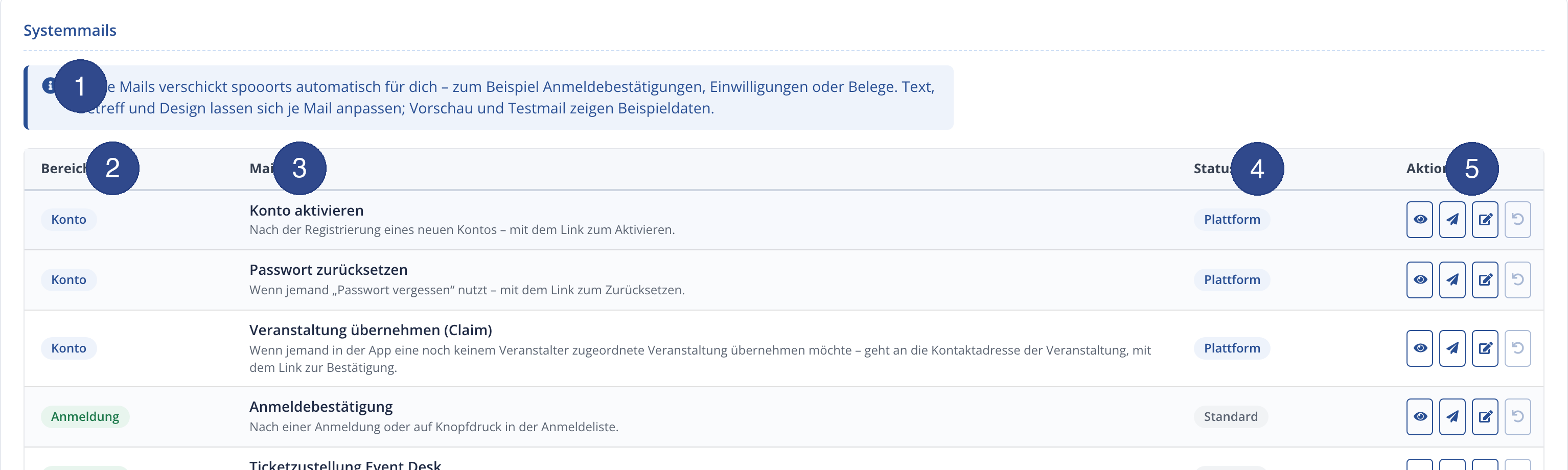
- 1 – Note
- The note explains that these mails are sent automatically and that text, subject and design can be adjusted per mail; preview and test mail use sample data.
- 2 – Area
- The coloured category assigns each mail to an area — e.g. Account, Registration or Participants.
- 3 – Mail
- The name and short description explain when the mail is triggered (e.g. "After a registration" or "QR ticket after online registration").
- 4 – Status
- The status shows whether the mail runs on the Default or is centrally managed as a Platform mail.
- 5 – Action
- For each mail four actions are available: preview (eye), send test mail (paper plane), edit (pencil) and reset to the default template (arrow).
Ballot emails
The Ballot has three of its own system emails, adjustable in text, subject and design like any other:
- “Ballot: application received” — confirmation after the application is submitted, with the draw date.
- “Ballot: drawn” — after the draw, to drawn applicants, with the ballot number and deadline.
- “Ballot: not drawn” — after the draw, to applicants not drawn, with the move-up place.
Three new placeholders are available for them: Draw date, Ballot number and Move-up place.
Tips
- At least adjust the tone and design to your organization — these mails are an important touchpoint with your members.
- Send yourself a test mail before activating, to check text and layout.
- With reset you can restore the default template at any time.
- Newsletters and email campaigns (marketing) are separate — system emails are purely transactional.