Point of Sale (POS)
Sell and take payment on site with the integrated point-of-sale system — for products, course fees, rentals and add-ons.
Overview
The point-of-sale (POS) system enables sales and payment directly on site — for shop products, course fees, rentals or spontaneous bookings. Sales feed into your reports.
With the integrated point of sale you sell and take payment directly on site — for products from the shop, course fees, rental items and additional services. Payment is by card via a connected terminal or in cash, and the receipt is sent immediately by email on request.
Every sale at the point of sale creates the same sales receipt as an online order and flows into the same financial evaluation. This way you have on-site and online revenue together in one place and need not record the till entries separately.
Discounts and vouchers can be redeemed directly at the point of sale, and cash payments are recorded just like card payments. This keeps the daily settlement traceable.
Because point of sale, shop and booking use the same stock and the same contacts, a place in the course is automatically reduced as soon as you sell a participation on site. This avoids double bookings and keeps stock and income consistent at all times.
Because every sale at the point of sale creates the same receipt as an online order, you have on-site and online revenue together in the same financial evaluation and need not record or reconcile the daily till separately.
The respective till balance and the individual bookings remain stored traceably for later settlement.
This way the point of sale bundles on-site sales with online processing in a single, traceable process.
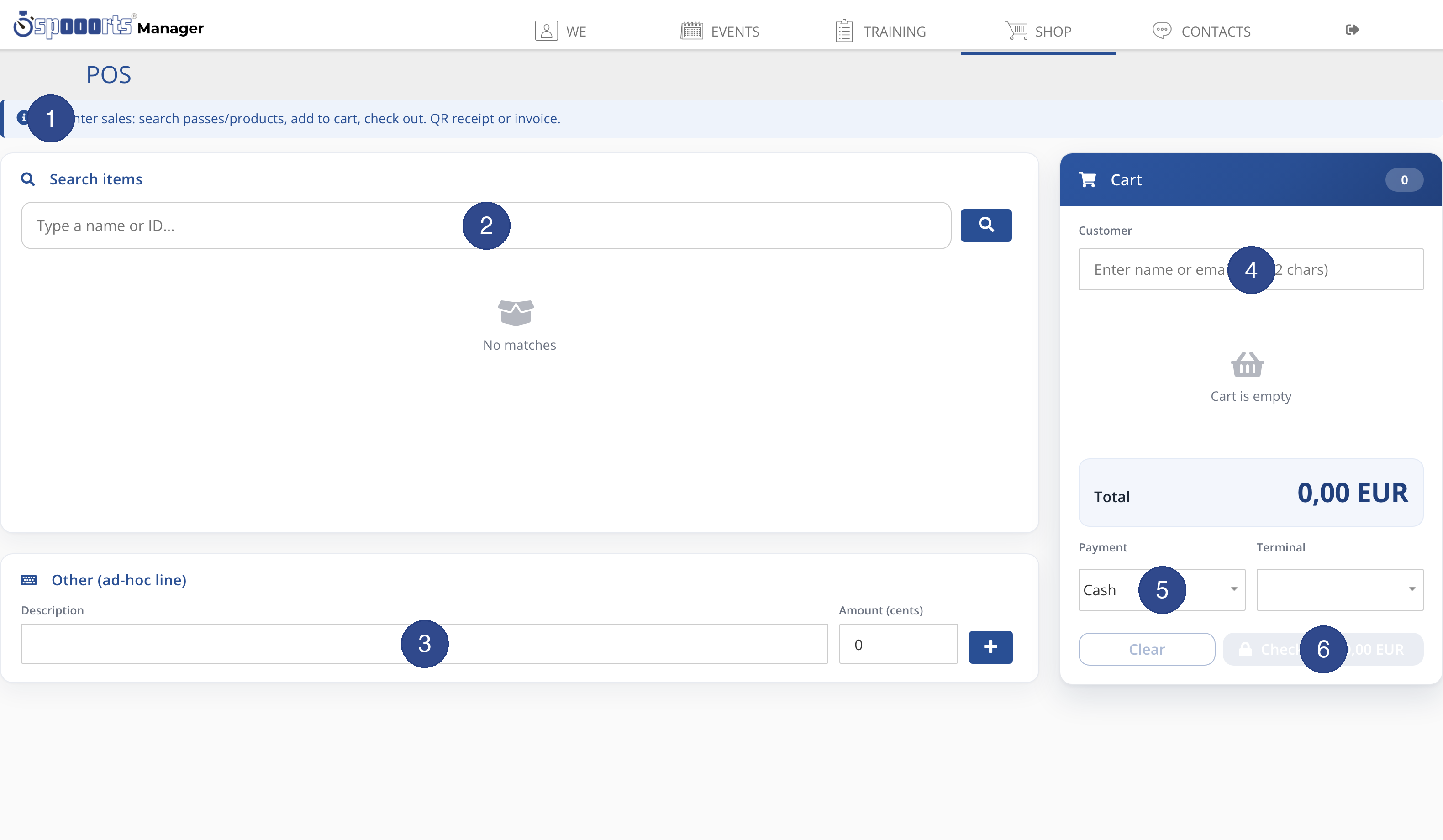
- ① Note
- The note describes the flow: search passes and products, add to cart, check out — with QR receipt or invoice.
- ② Search items
- Enter a name or ID to find a pass or product and add the match to the cart.
- ③ Other (ad-hoc line)
- For items not in the catalog, enter an ad-hoc line with description and amount and add it using the plus button.
- ④ Customer
- Use the Customer field to optionally assign the sale to a person (name or email) — for example for an invoice in the customer's name.
- ⑤ Payment & terminal
- Choose the payment method (e.g. cash) and, for card payment, the terminal. You configure the available payment methods and terminals in the POS settings.
- ⑥ Check out
- The total is calculated continuously. Use Check out to complete the sale; use Clear to discard the cart.
POS
Menu path: Shop → POS and POS settings. Take payment on site via terminals; receipts by e-mail. Payment methods: see Payment methods & payout.