Sponsors
Manage your sponsors' logos, set a tier per sponsor and show them automatically in the right places.
Overview
Under Sponsors, your sports school manages your sponsors' and partners' logos in one place. You set a tier per sponsor; spooorts then shows the logos automatically in the right places. A logo and a name are enough to get started.
Opening Sponsors
You find the sponsor management in the Manager under We → About us → Sponsors.
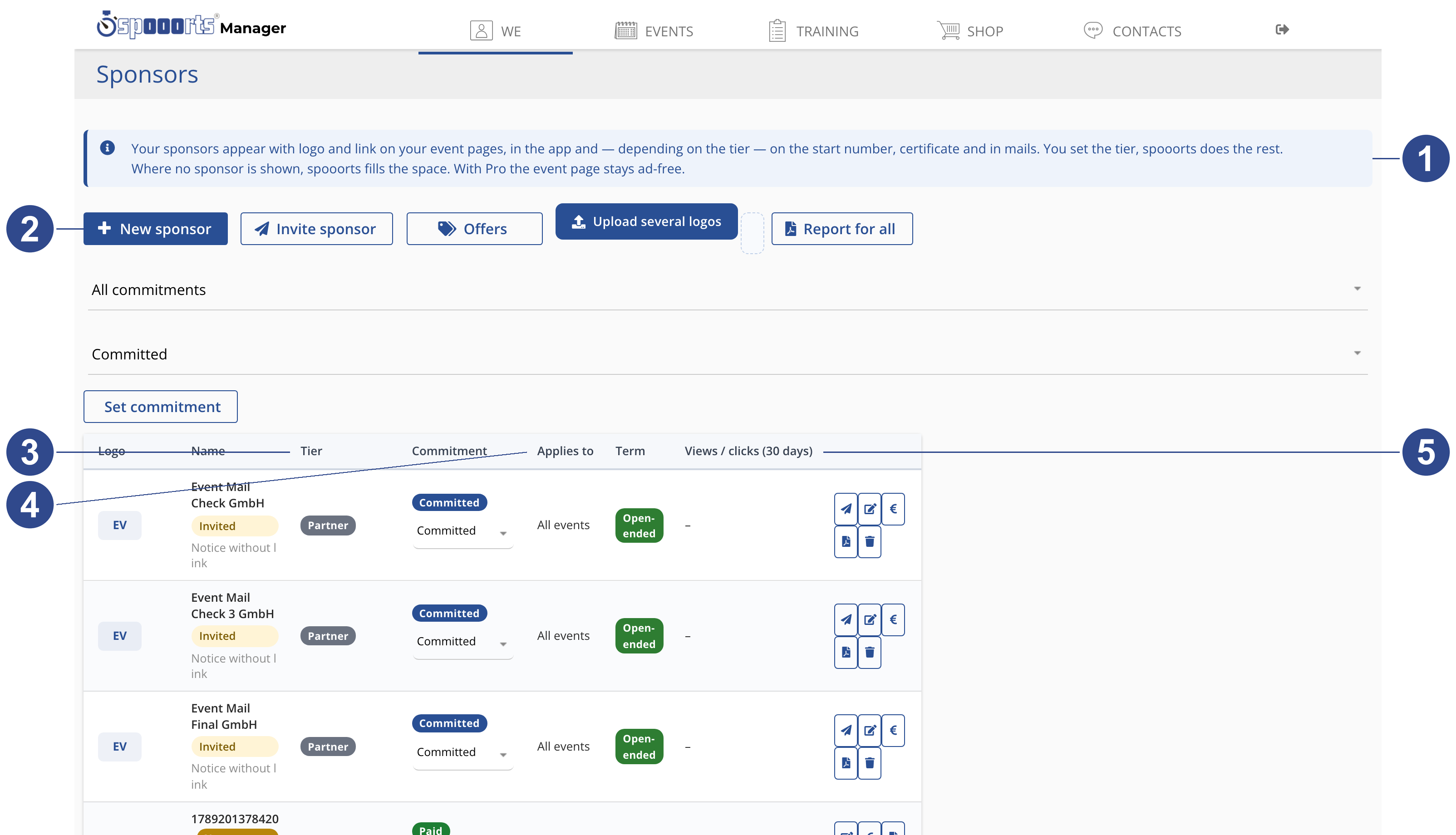
- ① Note
- Explains how your sponsors appear: with logo and link, and depending on tier in prominent places. Where no sponsor is set, spooorts fills the space; with Pro it stays ad-free.
- ② New sponsor
- Create a sponsor: upload the logo, enter name, link and tier. “Invite sponsor” sends an invitation instead, and “Upload several logos” brings in many logos at once.
- ③ Tier
- The tier sets how prominent a sponsor is — from title sponsor through premium partner and partner to supporter. You choose the tier, spooorts does the rest.
- ④ Applies to
- “Applies to” controls the reach: all events, selected sports or individual events. That way each sponsor shows exactly where it fits.
- ⑤ Views / clicks
- Views and clicks over the last 30 days show how well a sponsor logo performs — a solid figure for talks about renewal or tier.
Adding a sponsor
- Click New sponsor and upload a logo; name and logo are enough.
- Choose the Tier, optionally Applies to (all events, sports or single events) and the Term.
- Alternatively use Invite sponsor: The sponsor provides logo, link and offer themselves – no account needed.
The tiers
- Title sponsor
- Your main sponsor – present everywhere, one per event.
- Premium partner
- Strong visibility, branch-exclusive, up to four per event.
- Partner
- Logo on the event page and results.
- Supporter
- Thanks and a notice – for in-kind support.
Where the logos appear
Your sponsors appear with logo and link on your event pages, in the app and – depending on the tier – on the start number, certificate and in mails. You set the tier, spooorts does the rest. With Applies to you decide which events a sponsor covers (all, certain sports or single events).
Key fields
- Logo
- Transparent background, at most 3:1, GIF at most 3 loops.
- Name
- The sponsor's name.
- Link
- Without a link the logo appears as a notice and is not counted.
- Tier
- Title sponsor, premium partner, partner or supporter.
- Applies to
- All events / Sports / Selected events.
- Term
- From / Until (Open-ended).
- Industry
- Industry for the industry-exclusive premium tier.