Courses & Calendar
In the course catalog you create your school's courses — with name, description, capacity, duration, level and price. Trainer, location and date are assigned in the calendar.
Overview
The course catalog describes the "what" of your offering: a course defines name, description, capacity, duration, level and price. Optionally you define a cancellation policy, a booking window, eligible passes/cards and automatic reminders. The "when" and "who" — date, trainer and location — are assigned when you create an appointment in the calendar.
Registrations run via the public course page; when courses are fully booked, interested people on the waitlist move up automatically. For billing you sell courses individually or bundle them via a pass or subscription.
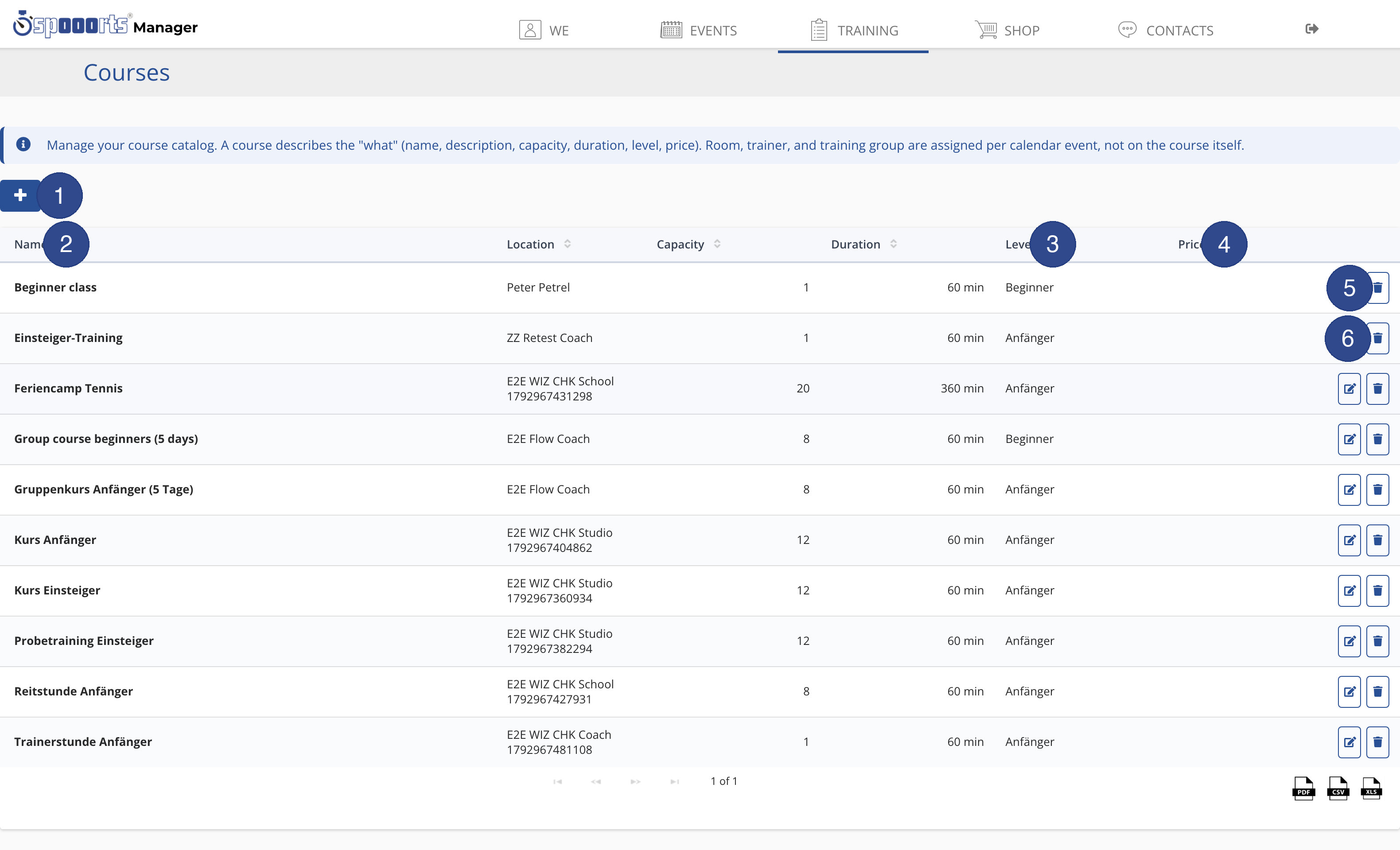
- ① New course
- Opens the form to create a new course. A course describes the "what" – name, capacity, duration, level and price; room, trainer and group are set later when scheduling in the calendar.
- ② Name
- The course name. Click the column to sort the catalog alphabetically.
- ③ Level
- The level of the course, e.g. beginner or advanced. This helps participants find the right course.
- ④ Price
- The price to take part in the course; if empty, the course is free or covered by a pass.
- ⑤ Edit
- Opens the course to change its name, description, capacity, duration, level and price.
- ⑥ Delete
- Permanently removes the course from the catalog after a confirmation prompt. Remove any scheduled dates from the calendar first.
Create courses
Menu path: Training → Courses and Calendar. A course has name, date(s), duration, capacity and price; season and series in the schedule.
Levels for the right course
Via the level (e.g. beginner, advanced, exam preparation) participants find the right course. The level is a property of the course; participants book the course that matches their ability themselves.
Courses and the calendar
A course in the catalog is initially a template. To make it happen, you create an appointment in the Calendar and assign trainer and location. Multi-part course series are modelled via recurring appointments (series).
Tips
- Set the capacity to match the location so booking is limited automatically.
- Create a course only once and schedule it via the calendar as often as you like.
- Enable reminders to reduce no-shows.