News
Keep participants informed about news, course changes and promotions — directly on the website and app.
Overview
You find this page in the menu under Contacts → Marketing → News.
In the News area you publish posts that appear on your website and in the app — for example new courses, the start of the season, exam dates or promotions. You can design posts with an image and text.
News is suitable for all announcements that go beyond a mere booking — changed course times, new offers, exam dates or promotions. Each post appears on website and app and can include an image and a link.
If you combine news with a push notification, you also reach participants who do not check the page on their own. This keeps communication bundled in one place, and you need not additionally distribute news through external channels. Older posts remain archived and can be updated at any time.
You decide per post whether it appears only on the website, only in the app or on both channels, and you can schedule publication in advance.
Because website and app automatically pull the same content, you maintain each piece of news only once and still reach both audiences. A regularly updated news area also signals to participants that your school is lively and well organised.
Older posts remain archived and can be found or updated at any time, so your school keeps a searchable history of its announcements.
Posts can be categorised so that participants can filter specifically for course info, dates or promotions.
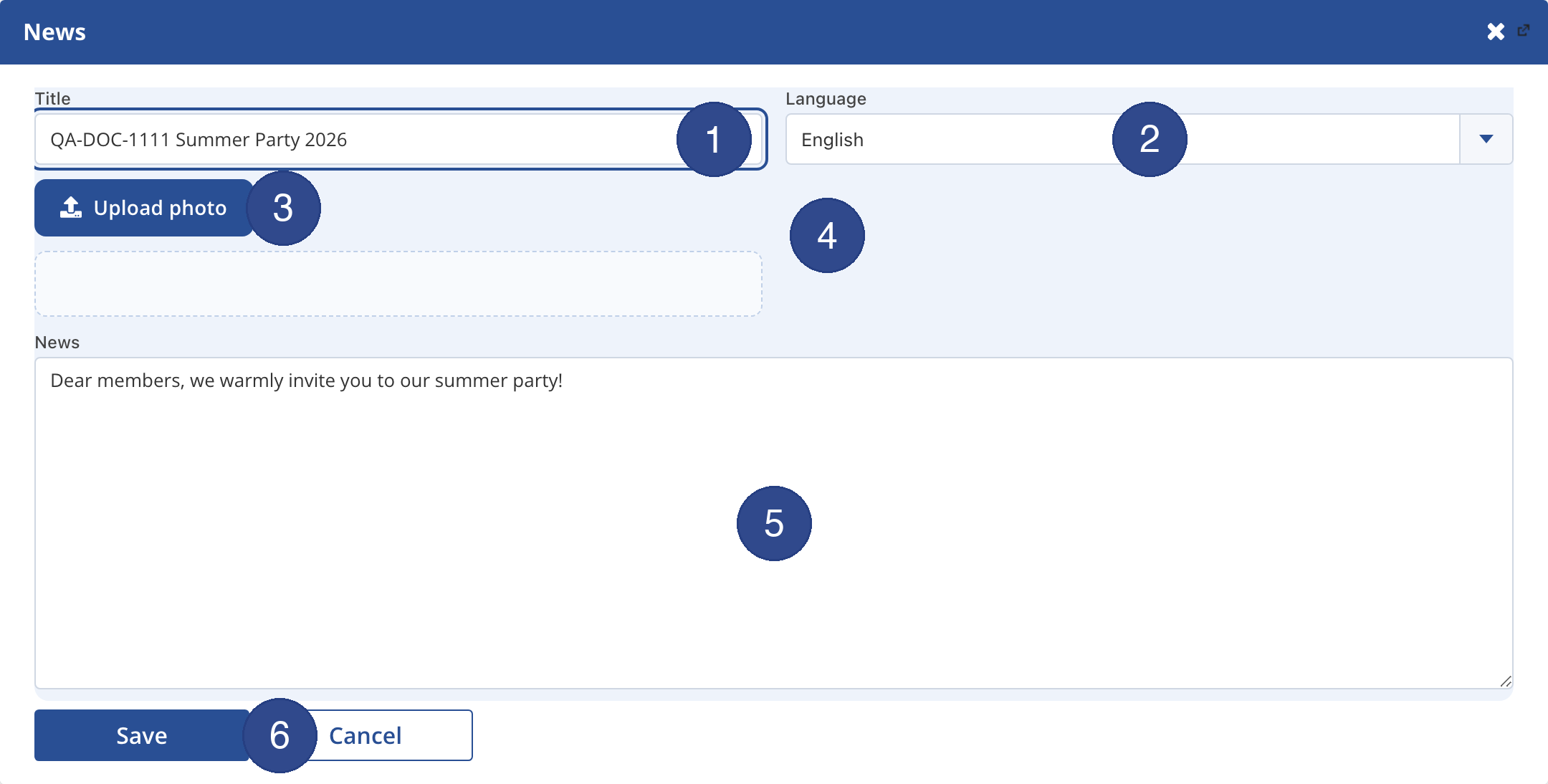
- ① Title
- Give the news a short, meaningful headline; it appears on the website and in the app.
- ② Language
- Choose the language of the post; each language version is managed separately.
- ③ Upload photo
- Adds an image (JPG, PNG); news with a photo gets more attention.
- ④ News image
- Shows the uploaded photo as a preview; it appears next to the news text.
- ⑤ News text
- Write the full text here; you can insert links.
- ⑥ Save
- Publishes the news immediately on the website and in the app.
News
Menu path: Contacts → News. Publish news on website and app.
Tips
- Announce the start of the season and courses early.
- Combine news with a push notification to reach more participants.