Price lists & tariffs per location
Store tariff groups per location, contact category, channel or country – the most specific list wins.
Overview
Under Shop → Products → Prices you define tariff groups per location, contact group, channel or country. At the point of sale the most specific matching list wins (order country > category > location > default, with priority as the tie-break). This lets you apply separate member and guest prices per location, for example. The mask has two tabs: Price lists for the tariff groups and Tariff locations for assigning plans to locations. Billing runs through Payment methods.
Create a new price list
Use the plus icon on the Price lists tab to open the dialog and enter the key details:
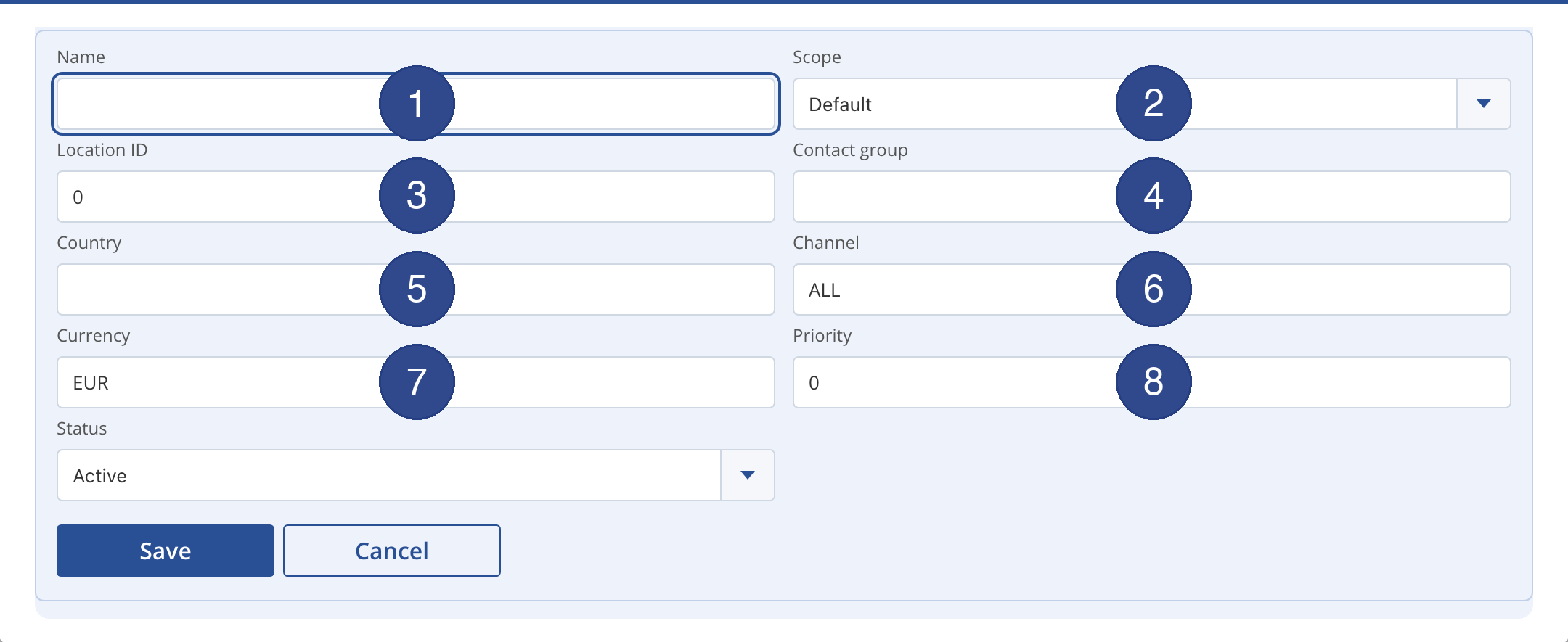
- 1 – Name
- Label of the price list, e.g. “Guest prices location North”.
- 2 – Scope
- Defines what the list applies by: default, location, category, country or channel.
- 3 – Location ID
- For location-based lists, the ID of the relevant location.
- 4 – Contact group
- Contact category the list applies to, such as member or guest.
- 5 – Country
- Country code for country-specific prices (e.g. differing VAT).
- 6 – Channel
- Sales channel the list applies to (e.g. ALL for all channels).
- 7 – Currency
- Currency of the prices, EUR by default.
- 8 – Priority
- Tie-break between equally specific lists: the higher priority wins.
Use Status to set the list active or inactive. Save creates it; afterwards you add the individual items (product and price) in the same dialog.
Tariff locations
On the Tariff locations tab you assign a tariff or pass plan to a location: select the plan and location and add them with the plus icon. This controls which plans are bookable at which location. Remove entries with the trash icon.