Grades, Licenses & Certificates
Record the grades and licenses of your participants and trainers — from belt grades in martial arts to instructor licenses for sailing, ski and riding.
Overview
You find this page in the menu under Contacts → Licenses.
In the license and grade catalog you record qualifications as master data. It includes, among others, belt grades (Kyu/Dan) for martial arts as well as trainer/instructor licenses for areas such as sailing, ski and riding. The current grade or license is assigned to a participant or trainer.
In the licence area you record grades, certificates and licences of your participants and trainers. The specific form depends on your sport:
belt grades in martial arts, diving certifications, sailing and powerboat licences, ski teaching levels or trainer and instructor licences. For each entry you store issue date, validity and optionally a document.
This way you see per person at a glance the current training status and recognise when a licence is due for renewal. For trainers you ensure that only qualified staff lead the appropriate courses; for participants the grade forms the basis for assignment to groups and for exams.
You recognise expiring licences in good time, so you can remind of necessary renewals or further training.
Because grades and licences are attached directly to the contact, they flow into group assignment, exams and — for trainers — the allocation of courses, without you having to keep them in a separate list.
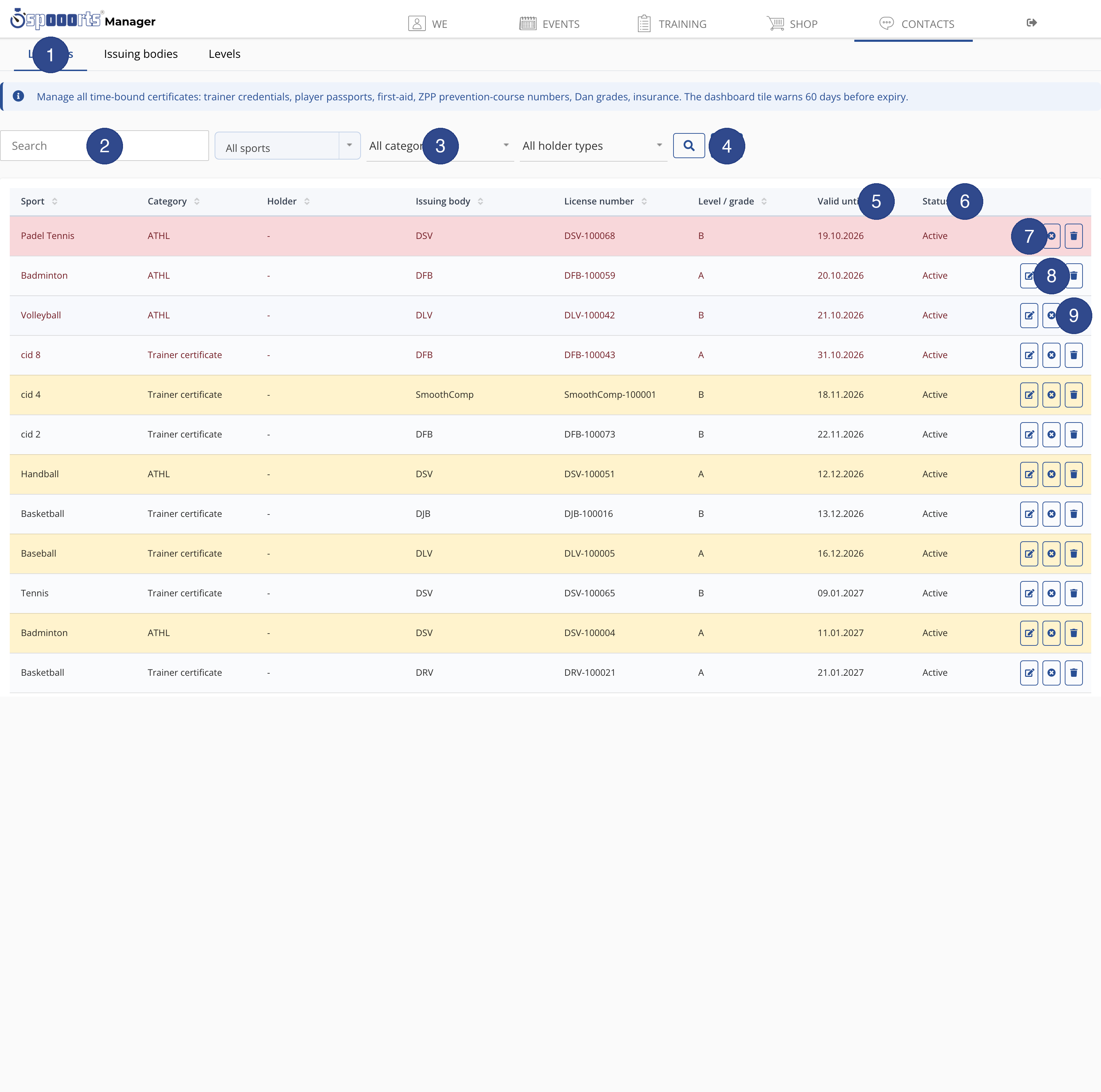
- ① Tabs
- Switches between the proofs themselves and the master data behind them: "Licenses" lists all entries, "Issuing bodies" maintains the organisations, "Levels" the selectable grades.
- ② Search
- Searches the list by holder, license number or issuing body, so you quickly find the right one even with many proofs.
- ③ Filter
- Narrows the list by sport, category and holder type, e.g. only trainer certificates or only student certificates of one sport.
- ④ Add new license
- Opens the form for a new proof, e.g. a trainer certificate, a student certificate, a first-aid certificate or a Dan grade, including validity and file upload.
- ⑤ Valid until
- The expiry date of the proof. The dashboard tile warns 60 days before expiry so you request a renewal in time.
- ⑥ Status
- Shows whether the proof is valid, expired or still to be checked. You approve or reject uploaded proofs.
- ⑦ Edit
- Opens the proof to change its level, number, validity and stored file and to check the scan.
- ⑧ Revoke
- Sets the proof to revoked so it no longer counts as valid, while keeping it on record as history.
- ⑨ Delete
- Permanently removes the proof from the list after a confirmation prompt. Revoking is usually enough if you want to keep the history.
Licenses & certifications
Menu path: We → Licenses. Store certification/license requirement (e.g. diving/sailing brevet) and levels as proof at registration.